
Get Started
Sakana AI offers two models through its API: Fugu and Sakana Namazu. Both are accessible with the same API key issued from the console, via OpenAI-compatible endpoints.
- Fugu — A multi-agent system that orchestrates multiple frontier models. Supports Chat Completions, Responses, and Anthropic Messages APIs.
- Sakana Namazu — A Japanese-focused LLM with built-in tools such as web search and code execution. Supports Chat Completions, Responses, and Anthropic Messages APIs. Sakana Namazu is not included in subscription plans — it is billed purely on a pay-as-you-go (per-token) basis.
All API endpoints are available at:
https://api.sakana.aiCreate an API key
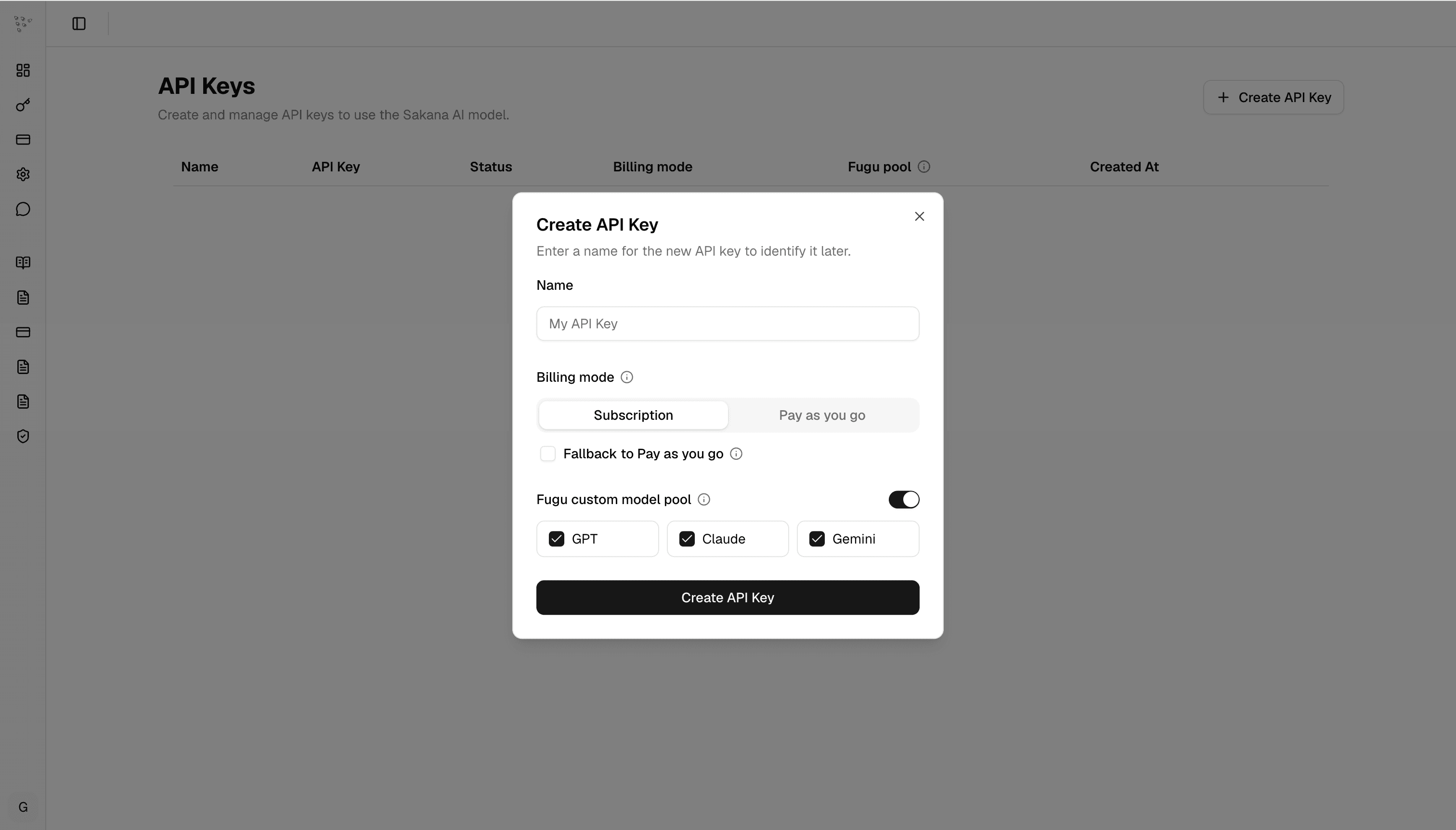
Before using Fugu or Sakana Namazu, create an API key and copy the generated key. The key is shown only once, so store it somewhere secure before closing the dialog. For details on billing modes and rates, see Pricing.
Using Fugu
To verify that your API key is working and that you can successfully interact with a Fugu model, run:
export SAKANA_API_KEY={your api key}

curl -X POST https://api.sakana.ai/v1/chat/completions \
  -H "Content-Type: application/json" \
  -H "Authorization: Bearer $SAKANA_API_KEY" \
  -d '{"model":"fugu","messages":[{"role":"user","content":"How many r in word strawberry"}]}'
The fugu model routes across all supported providers by default. If you need to opt out of a provider for fugu routing, enable Fugu custom model pool while creating or editing the API key, then leave only the providers you want fugu to use. Leave the setting off to use the full default pool.
Using Fugu in Codex or Claude Code
Sakana Fugu plugs into the Codex CLI and Claude Code through a small provider configuration. To quickly get started, you can install Fugu with a single command:
curl -fsSL https://sakana.ai/fugu/install | bashThen launch Codex with:
codex-fuguor Claude Code with:
claude-fuguSee the command reference in our official repository for additional flags and options. The one-line install supports Ubuntu and macOS. On Windows, or if the install does not complete in your local environment, set it up by hand: see Manually Setting Up Codex for Codex, or Manually Setting Up Claude Code for Claude Code.
Sakana Fugu also works with Claude Code. Because Claude Code is closed source, you may notice some compatibility differences (mostly cosmetic). See Compatibility with Claude Code below, and Manually Setting Up Claude Code to wire it up by hand.
Note that the claude-fugu launcher does not auto-update: to pick up the latest Fugu support for Claude Code, such as new Fugu models, check this Get Started page and apply the update manually.
Using Fugu in Custom Workflows
Sakana Fugu is compatible with the standard OpenAI SDK interface. The following Python example uses the Responses API to query fugu-ultra.
from openai import OpenAI

api_key = "YOUR_API_KEY"

client = OpenAI(
    base_url="https://api.sakana.ai/v1",
    api_key=api_key
)

response = client.responses.create(
    model="fugu-ultra",
    input="Write a concise explanation of how TLS works",
    timeout=120.0,
)

print(response.output_text)
Note:
model="fugu-ultra-v1.1"supports three reasoning effort levels:high,xhigh, andmax(a distinct maximum level for the hardest problems).model="fugu-max",model="fugu-ultra"(Fugu Ultra v2.0),model="fugu",model="fugu-ultra-v1.0", andmodel="fugu-cyber"supporthighandxhigh(maxis also accepted for compatibility and maps toxhigh). Set the level via thereasoning.effortparameter (for example,effort="high"); any other value is rejected.
Note: For complex tasks, especially when using
fugu-ultraandfugu-cyber, you may need to increase client-side timeouts.
Sakana Fugu also supports more advanced configurations, such as built-in tools like web search and the Chat Completions API.
Manually Setting Up Codex
Prefer to write the files yourself, or just inspect what the installer does? The steps below produce the same setup.
The Sakana Fugu provider block in config.toml adds three stream-resilience keys on top of a plain provider definition, marked clearly below:
stream_idle_timeout_ms = 7200000   # 2h: don't drop slow turns at Codex's ~5-min idle default
stream_max_retries = 5             # reconnect a dropped stream instead of failing the turn
request_max_retries = 4            # retry a transient HTTP failure instead of failing the turn
1. Install Codex (optional)
If you don't already have it, install the Codex CLI version pinned by the Sakana Fugu bundle (the BUNDLE_CODEX_VERSION value in bundle.sh):
# Standalone installer (macOS / Linux, no Node required):
curl -fsSL https://chatgpt.com/codex/install.sh | sh -s -- --release <version>

# or via npm:
npm i -g @openai/codex@<version>
2. Model catalog
Save the following to ~/.codex/fugu.json. The base_instructions carry Sakana Fugu's shipped agent-conduct safety guards (the canonical copy lives at SakanaAI/fugu):
{
  "models": [
    {
      "slug": "fugu-max",
      "display_name": "Fugu Max",
      "context_window": 1000000,
      "supported_reasoning_levels": [
        {
          "effort": "high",
          "description": "default reasoning effort to balance speed and performance"
        },
        {
          "effort": "xhigh",
          "description": "deep reasoning for complex problem"
        }
      ],
      "shell_type": "shell_command",
      "visibility": "list",
      "supported_in_api": true,
      "priority": 0,
      "base_instructions": "Before recommending or running any command that could stop, restart, or replace the environment you are running in \u2014 e.g. `wsl --shutdown` / `wsl --terminate`, host or VM reboot, `systemctl`/service restarts of your runtime, or killing your own shell, container, or session processes \u2014 first determine whether you are executing inside that same environment. If you might be, do not run it yourself: warn the user explicitly that the command will end this session and your ability to help until it is restarted, give the exact recovery steps, and let the user run it manually when they are ready.\n\nNever force-kill processes by raw PID against arbitrary or unknown PID lists (e.g. `kill -9`, `Stop-Process -Force`, `taskkill /F`): the agent runtime depends on its own child processes, and force-killing them can permanently break the session. To stop a dev server or free a port, stop the owning task by name; otherwise ask the user before terminating any PID.",
      "supports_reasoning_summaries": false,
      "default_reasoning_summary": "none",
      "support_verbosity": false,
      "default_verbosity": null,
      "apply_patch_tool_type": "freeform",
      "input_modalities": [
        "text",
        "image"
      ],
      "truncation_policy": {
        "mode": "tokens",
        "limit": 10000
      },
      "supports_parallel_tool_calls": true,
      "experimental_supported_tools": []
    },
    {
      "slug": "fugu-ultra",
      "display_name": "Fugu Ultra v2.0",
      "context_window": 1000000,
      "supported_reasoning_levels": [
        {
          "effort": "high",
          "description": "default reasoning effort to balance speed and performance"
        },
        {
          "effort": "xhigh",
          "description": "deep reasoning for complex problem"
        }
      ],
      "shell_type": "shell_command",
      "visibility": "list",
      "supported_in_api": true,
      "priority": 1,
      "base_instructions": "Before recommending or running any command that could stop, restart, or replace the environment you are running in \u2014 e.g. `wsl --shutdown` / `wsl --terminate`, host or VM reboot, `systemctl`/service restarts of your runtime, or killing your own shell, container, or session processes \u2014 first determine whether you are executing inside that same environment. If you might be, do not run it yourself: warn the user explicitly that the command will end this session and your ability to help until it is restarted, give the exact recovery steps, and let the user run it manually when they are ready.\n\nNever force-kill processes by raw PID against arbitrary or unknown PID lists (e.g. `kill -9`, `Stop-Process -Force`, `taskkill /F`): the agent runtime depends on its own child processes, and force-killing them can permanently break the session. To stop a dev server or free a port, stop the owning task by name; otherwise ask the user before terminating any PID.",
      "supports_reasoning_summaries": true,
      "default_reasoning_summary": "none",
      "support_verbosity": false,
      "default_verbosity": null,
      "apply_patch_tool_type": "freeform",
      "input_modalities": [
        "text",
        "image"
      ],
      "truncation_policy": {
        "mode": "tokens",
        "limit": 10000
      },
      "supports_parallel_tool_calls": true,
      "experimental_supported_tools": []
    },
    {
      "slug": "fugu",
      "display_name": "Fugu",
      "context_window": 1000000,
      "supported_reasoning_levels": [
        {
          "effort": "high",
          "description": "default reasoning effort to balance speed and performance"
        },
        {
          "effort": "xhigh",
          "description": "deep reasoning for complex problem"
        }
      ],
      "shell_type": "shell_command",
      "visibility": "list",
      "supported_in_api": true,
      "priority": 2,
      "base_instructions": "Before recommending or running any command that could stop, restart, or replace the environment you are running in \u2014 e.g. `wsl --shutdown` / `wsl --terminate`, host or VM reboot, `systemctl`/service restarts of your runtime, or killing your own shell, container, or session processes \u2014 first determine whether you are executing inside that same environment. If you might be, do not run it yourself: warn the user explicitly that the command will end this session and your ability to help until it is restarted, give the exact recovery steps, and let the user run it manually when they are ready.\n\nNever force-kill processes by raw PID against arbitrary or unknown PID lists (e.g. `kill -9`, `Stop-Process -Force`, `taskkill /F`): the agent runtime depends on its own child processes, and force-killing them can permanently break the session. To stop a dev server or free a port, stop the owning task by name; otherwise ask the user before terminating any PID.",
      "supports_reasoning_summaries": false,
      "default_reasoning_summary": "none",
      "support_verbosity": false,
      "default_verbosity": null,
      "apply_patch_tool_type": "freeform",
      "input_modalities": [
        "text",
        "image"
      ],
      "truncation_policy": {
        "mode": "tokens",
        "limit": 10000
      },
      "supports_parallel_tool_calls": true,
      "experimental_supported_tools": []
    },
    {
      "slug": "fugu-ultra-v1.1",
      "display_name": "Fugu Ultra v1.1",
      "context_window": 1000000,
      "supported_reasoning_levels": [
        {
          "effort": "high",
          "description": "default reasoning effort to balance speed and performance"
        },
        {
          "effort": "xhigh",
          "description": "deep reasoning for complex problem"
        },
        {
          "effort": "max",
          "description": "Maximum reasoning for the hardest problems"
        }
      ],
      "shell_type": "shell_command",
      "visibility": "list",
      "supported_in_api": true,
      "priority": 3,
      "base_instructions": "Before recommending or running any command that could stop, restart, or replace the environment you are running in \u2014 e.g. `wsl --shutdown` / `wsl --terminate`, host or VM reboot, `systemctl`/service restarts of your runtime, or killing your own shell, container, or session processes \u2014 first determine whether you are executing inside that same environment. If you might be, do not run it yourself: warn the user explicitly that the command will end this session and your ability to help until it is restarted, give the exact recovery steps, and let the user run it manually when they are ready.\n\nNever force-kill processes by raw PID against arbitrary or unknown PID lists (e.g. `kill -9`, `Stop-Process -Force`, `taskkill /F`): the agent runtime depends on its own child processes, and force-killing them can permanently break the session. To stop a dev server or free a port, stop the owning task by name; otherwise ask the user before terminating any PID.",
      "supports_reasoning_summaries": true,
      "default_reasoning_summary": "none",
      "support_verbosity": false,
      "default_verbosity": null,
      "apply_patch_tool_type": "freeform",
      "input_modalities": [
        "text",
        "image"
      ],
      "truncation_policy": {
        "mode": "tokens",
        "limit": 10000
      },
      "supports_parallel_tool_calls": true,
      "experimental_supported_tools": []
    },
    {
      "slug": "fugu-ultra-v1.0",
      "display_name": "Fugu Ultra v1.0",
      "context_window": 1000000,
      "supported_reasoning_levels": [
        {
          "effort": "high",
          "description": "default reasoning effort to balance speed and performance"
        },
        {
          "effort": "xhigh",
          "description": "deep reasoning for complex problem"
        }
      ],
      "shell_type": "shell_command",
      "visibility": "list",
      "supported_in_api": true,
      "priority": 4,
      "base_instructions": "Before recommending or running any command that could stop, restart, or replace the environment you are running in \u2014 e.g. `wsl --shutdown` / `wsl --terminate`, host or VM reboot, `systemctl`/service restarts of your runtime, or killing your own shell, container, or session processes \u2014 first determine whether you are executing inside that same environment. If you might be, do not run it yourself: warn the user explicitly that the command will end this session and your ability to help until it is restarted, give the exact recovery steps, and let the user run it manually when they are ready.\n\nNever force-kill processes by raw PID against arbitrary or unknown PID lists (e.g. `kill -9`, `Stop-Process -Force`, `taskkill /F`): the agent runtime depends on its own child processes, and force-killing them can permanently break the session. To stop a dev server or free a port, stop the owning task by name; otherwise ask the user before terminating any PID.",
      "supports_reasoning_summaries": true,
      "default_reasoning_summary": "none",
      "support_verbosity": false,
      "default_verbosity": null,
      "apply_patch_tool_type": "freeform",
      "input_modalities": [
        "text",
        "image"
      ],
      "truncation_policy": {
        "mode": "tokens",
        "limit": 10000
      },
      "supports_parallel_tool_calls": true,
      "experimental_supported_tools": []
    },
    {
      "slug": "fugu-cyber",
      "display_name": "Fugu Cyber",
      "context_window": 1000000,
      "supported_reasoning_levels": [
        {
          "effort": "high",
          "description": "default reasoning effort to balance speed and performance"
        },
        {
          "effort": "xhigh",
          "description": "deep reasoning for complex problem"
        }
      ],
      "shell_type": "shell_command",
      "visibility": "list",
      "supported_in_api": true,
      "priority": 5,
      "base_instructions": "Before recommending or running any command that could stop, restart, or replace the environment you are running in \u2014 e.g. `wsl --shutdown` / `wsl --terminate`, host or VM reboot, `systemctl`/service restarts of your runtime, or killing your own shell, container, or session processes \u2014 first determine whether you are executing inside that same environment. If you might be, do not run it yourself: warn the user explicitly that the command will end this session and your ability to help until it is restarted, give the exact recovery steps, and let the user run it manually when they are ready.\n\nNever force-kill processes by raw PID against arbitrary or unknown PID lists (e.g. `kill -9`, `Stop-Process -Force`, `taskkill /F`): the agent runtime depends on its own child processes, and force-killing them can permanently break the session. To stop a dev server or free a port, stop the owning task by name; otherwise ask the user before terminating any PID.",
      "supports_reasoning_summaries": true,
      "default_reasoning_summary": "none",
      "support_verbosity": false,
      "default_verbosity": null,
      "apply_patch_tool_type": "freeform",
      "input_modalities": [
        "text",
        "image"
      ],
      "truncation_policy": {
        "mode": "tokens",
        "limit": 10000
      },
      "supports_parallel_tool_calls": true,
      "experimental_supported_tools": []
    }
  ]
}
3. Profile
Copy the following to ~/.codex/fugu.config.toml:
model = "fugu-max"
model_reasoning_effort = "high"
model_provider = "sakana"
model_catalog_json = "~/.codex/fugu.json"

[features]
image_generation = false
apps = false
4. Provider block
Copy the following to ~/.codex/config.toml.
You can also save it to:
{your_workspace}/.codex/config.tomlinstead of your home directory.
The last three keys are the stream-resilience hardening (verified safe; Sakana Fugu is stateless, so retries are idempotent):
[model_providers.sakana]
name = "Sakana API"
base_url = "https://api.sakana.ai/v1"
env_key = "SAKANA_API_KEY"
wire_api = "responses"

stream_idle_timeout_ms = 7200000
# keep slow turns alive past Codex's ~5-min idle default

stream_max_retries = 5
# reconnect a dropped stream rather than failing the turn

request_max_retries = 4
# retry a transient HTTP failure rather than failing the turn
5. Start Codex
It defaults to fugu-max. Switch models with /model:
# It defaults to fugu-max; you can switch models using the /model command.
SAKANA_API_KEY={your api key} codex -p fugu
Manually Setting Up Claude Code
Prefer to wire it up yourself? Claude Code points at Sakana Fugu through a set of ANTHROPIC_* environment variables, with no launcher required. The quickest way is to export them in your current shell session and then run claude. Use ANTHROPIC_AUTH_TOKEN (a bearer token), not ANTHROPIC_API_KEY.
export ANTHROPIC_BASE_URL="https://api.sakana.ai"
export ANTHROPIC_AUTH_TOKEN="fish_..."                  # your Sakana key
export ANTHROPIC_DEFAULT_OPUS_MODEL="fugu-max[1m]"
export ANTHROPIC_DEFAULT_SONNET_MODEL="fugu[1m]"
export ANTHROPIC_DEFAULT_HAIKU_MODEL="fugu[1m]"
export ANTHROPIC_DEFAULT_FABLE_MODEL="fugu-ultra[1m]"
export CLAUDE_CODE_SUBAGENT_MODEL="fugu[1m]"

claude                                                  # now talks to Fugu
This lasts for the current shell session. The Opus tier maps to fugu-max[1m], Sonnet and Haiku to fugu[1m], and the Fable tier to fugu-ultra[1m]; subagents use fugu[1m]. Sessions start on fugu-max[1m] at high effort.
Two models are optional extras rather than tiers. Add ANTHROPIC_CUSTOM_MODEL_OPTION="fugu-ultra-v1.1[1m]" to get a pinned Ultra release row in /model, and point a tier at fugu-cyber[1m] only if your key is approved for it.
Compatibility with Claude Code
Claude Code is closed source, so Sakana Fugu drives it entirely through the documented ANTHROPIC_* variables and our server-side gateway. A few surfaces therefore reflect Claude Code's built-in Anthropic assumptions rather than Fugu's lineup, and they are cosmetic only: the model you talk to, its responses, streaming, tool use, and subagents all behave exactly as configured.
The notable ones:
- Effort slider. Claude Code shows six stops (
lowthroughultracode); Fugu maps them onto its two real levels at thehigh/xhighboundary, so stops within a group are equivalent.claude-fugustarts each session athigh. - Model picker. On recent Claude Code,
claude-fugureplaces the built-in tier list with one row per Fugu model, so the picker matches the lineup above. On older clients, or in a manual setup, Sonnet and Haiku both resolve tofugu[1m], so two identical rows appear; without curated labels, descriptions name the Anthropic tier rather than the Fugu model. - Session header. Billing and default-tier labels reflect API-token usage.
Because Claude Code evolves independently, new cosmetic mismatches may surface over time.
Using Sakana Namazu
Quick start
Sakana Namazu uses the same API key as Fugu. It is not included in subscription plans — billing is purely pay-as-you-go (per-token). Start by verifying connectivity with curl:
export SAKANA_API_KEY={your api key}

curl -X POST https://api.sakana.ai/v1/chat/completions \
  -H "Content-Type: application/json" \
  -H "Authorization: Bearer $SAKANA_API_KEY" \
  -d '{"model":"sakana-namazu","messages":[{"role":"user","content":"こんにちは!"}]}'
To call Sakana Namazu from Python using the OpenAI SDK:
from openai import OpenAI

api_key = "YOUR_API_KEY"

client = OpenAI(
    base_url="https://api.sakana.ai/v1",
    api_key=api_key
)

response = client.chat.completions.create(
    model="sakana-namazu",
    messages=[{"role": "user", "content": "こんにちは!"}],
)

print(response.choices[0].message.content)
Sakana Namazu also supports image input, file input (PDF, XLSX, CSV, DOCX, etc.), built-in tools (web_search, code_interpreter), and extended thinking. See the Models page for details and code examples. For rates, see Pricing.
 Ask Sakana Chat