
Models
Sakana Namazu
Sakana Namazu
Sakana Namazu is a Japanese-specialized LLM that combines a deep understanding of Japanese culture and business customs with high-performance language capabilities. Built on the open model Kimi K2.6 and refined with Sakana AI's in-house data for Japanese language and business workflows, it handles complex tasks using web search and code execution. Unlike Fugu, which orchestrates multiple frontier models, Sakana Namazu provides a single in-house model as an API.
| Property | Value |
|---|---|
| Model ID | sakana-namazu-v1.0 |
| Alias | sakana-namazu |
| Context window | 256K tokens |
| Streaming | Supported |
| Image input | Supported (URL and base64) |
| File input | PDF, XLSX, CSV, DOCX, and more (max 4 MB per file) |
| Structured output | json_schema and json_object |
Benchmark comparison
Sakana Namazu's strengths lie in two areas: advanced reasoning and problem-solving, and strong performance in Japanese language and Japan-specific contexts.
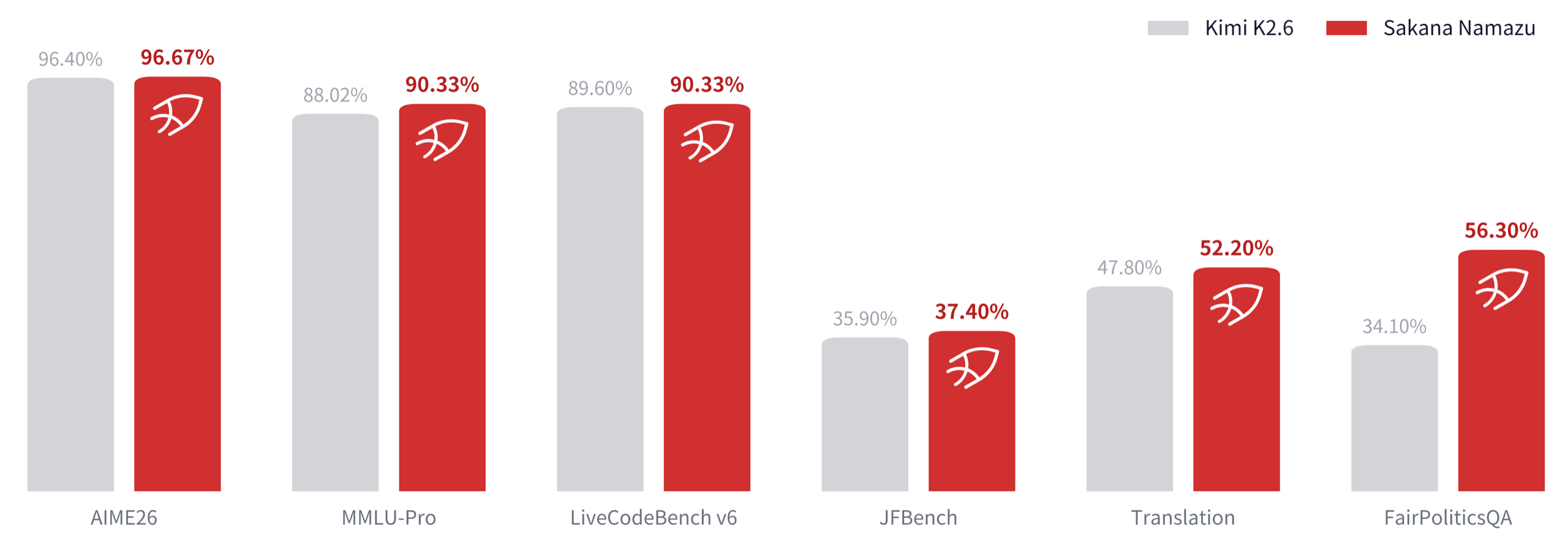
Reasoning and problem-solving are evaluated with AIME26 (mathematical reasoning), MMLU-Pro (broad knowledge and reasoning), and LiveCodeBench v6 (coding). Sakana Namazu retains the high performance of its base model Kimi K2.6 through careful tuning, demonstrating strong task completion ability — understanding complex problems, reasoning through them, and arriving at solutions.
Japanese language and Japan-specific understanding are evaluated with JFBench (Japanese instruction following and response quality), an internal translation benchmark (Japanese translation quality), and FairPoliticsQA (neutrality and balance on political topics). Sakana Namazu outperforms the base model on all three. In particular, FairPoliticsQA improved from 34.10% to 56.30%, demonstrating that the model can produce balanced responses even on sensitive topics.
Sakana Namazu API endpoint
Sakana Namazu uses the same API endpoint as Fugu. Point your OpenAI SDK client at the endpoint — only the model parameter needs to change:
# pip install openai
import os
from openai import OpenAI

client = OpenAI(
    api_key=os.environ["SAKANA_API_KEY"],
    base_url="https://api.sakana.ai/v1",
)

response = client.chat.completions.create(
    model="sakana-namazu",
    messages=[{"role": "user", "content": "こんにちは!"}],
)

print(response.choices[0].message.content)
Image input
Sakana Namazu accepts images via URL or base64-encoded data. Pass them as image_url content parts in the messages array:
import base64
from openai import OpenAI

client = OpenAI(
    base_url="https://api.sakana.ai/v1",
    api_key="YOUR_API_KEY",
)

with open("photo.png", "rb") as f:
    img_b64 = base64.b64encode(f.read()).decode()

response = client.chat.completions.create(
    model="sakana-namazu",
    messages=[{
        "role": "user",
        "content": [
            {"type": "text", "text": "Describe this image."},
            {"type": "image_url", "image_url": {"url": f"data:image/png;base64,{img_b64}"}},
        ],
    }],
)

print(response.choices[0].message.content)
File input
You can attach files (PDF, XLSX, CSV, DOCX, and more — max 4 MB per file) as base64-encoded input_file content parts. Combined with code_interpreter, the model can read and process the file directly:
import base64
from openai import OpenAI

client = OpenAI(
    base_url="https://api.sakana.ai/v1",
    api_key="YOUR_API_KEY",
)

with open("data.csv", "rb") as f:
    data_b64 = base64.b64encode(f.read()).decode()

response = client.responses.create(
    model="sakana-namazu",
    input=[{
        "role": "user",
        "content": [
            {
                "type": "input_file",
                "filename": "data.csv",
                "file_data": f"data:text/csv;base64,{data_b64}",
            },
            {
                "type": "input_text",
                "text": "Analyze this CSV and visualize the key trends.",
            },
        ],
    }],
    tools=[{"type": "code_interpreter"}],
)

print(response.output_text)
Sakana Namazu supported endpoints
| Endpoint | Method | Description |
|---|---|---|
/v1/chat/completions | POST | OpenAI Chat Completions API |
/v1/responses | POST | OpenAI Responses API |
/v1/messages | POST | Anthropic Messages API |
/v1/models | GET | List available models |
Responses API supported request fields
The Sakana Namazu Responses API is available at /v1/responses. See the OpenAI Responses API reference for details.
| Field | Type | Description |
|---|---|---|
model | string | Required. The model ID. sakana-namazu. |
input | string | array | Text (sent as a single user message) or an array of message items. |
instructions | string | Prepended as a system message. |
max_output_tokens | integer | Maximum number of tokens to generate (including thinking). Defaults to 65,536. |
temperature | number | Sampling temperature. |
top_p | number | Nucleus sampling. |
stream | boolean | Enable streaming. |
tools | array | Function tool definitions or built-in tools (web_search, code_interpreter). |
tool_choice | string | object | Controls whether and which tools to call. |
text.format | object | Structured output. Supports json_schema and json_object. |
previous_response_id and response_format (use text.format instead) are rejected.
Chat Completions supported request fields
The Chat Completions API is available at /v1/chat/completions. See the OpenAI Chat Completions API reference for details.
| Field | Type | Description |
|---|---|---|
model | string | Required. The model ID. sakana-namazu. |
messages | array | Array of messages. Supports text, image, and file content parts. |
max_tokens | integer | Maximum number of tokens to generate (including thinking). Defaults to 65,536. |
max_completion_tokens | integer | Alternative to max_tokens. Takes precedence when both are provided. |
temperature | number | Sampling temperature. |
top_p | number | Nucleus sampling. |
stream | boolean | Enable streaming. |
tools | array | Function tool definitions or built-in tools (web_search, code_interpreter). |
tool_choice | string | object | Controls whether and which tools to call. |
response_format | object | Structured output. Supports json_schema and json_object. |
functions / function_call are rejected as legacy. Other top-level fields (stop, presence_penalty, frequency_penalty, seed, etc. are also supported.
Messages API supported request fields
The Anthropic-compatible Messages API is available at /v1/messages. See the Anthropic Messages API reference for details.
| Field | Type | Description |
|---|---|---|
model | string | Required. The model ID. sakana-namazu. |
max_tokens | integer | Required. Maximum number of tokens to generate. |
messages | array | Required. Array of messages. Supports text, image, and file content blocks. |
system | string | array | System prompt. A string or an array of text blocks. |
temperature | number | Sampling temperature. |
top_p | number | Nucleus sampling. |
top_k | integer | Top-K sampling. |
stream | boolean | Enable streaming. |
tools | array | Function tool definitions or built-in tools (web_search, code_interpreter). Unknown tool types are rejected. |
tool_choice | object | Controls whether and which tools to call. Supports auto, none, any, and tool. |
stop_sequences | array | Stop sequences. |
Other top-level fields such as metadata are also supported.
Sakana Namazu built-in tools
Sakana Namazu supports the following built-in tools. Add them to your request's tools array. The model calls them autonomously in an agentic loop — you do not need to execute them yourself.
| Tool | Description |
|---|---|
web_search | Search the web and retrieve ranked results with snippets. |
code_interpreter | Execute Python code in a sandboxed environment. Files attached to the request are available inside the sandbox. The session persists within the request. |
Here is an example using web_search:
from openai import OpenAI

client = OpenAI(
    base_url="https://api.sakana.ai/v1",
    api_key="YOUR_API_KEY",
)

response = client.responses.create(
    model="sakana-namazu",
    tools=[{"type": "web_search"}],
    input="What is today's weather in Tokyo?",
)

print(response.output_text)
With code_interpreter, files attached to the request are available for the model to read directly. Files generated during code execution are returned as download URLs (valid for 1 hour).
- Responses API: Generated files appear as
fileentries inside thecode_interpreter_calloutput item, includingdownload_url,filename, andsize_bytes. - Anthropic Messages API: Generated files appear as
code_execution_outputblocks insidecode_execution_tool_result. - Chat Completions API: Generated file metadata is not available (only stdout / stderr).
Combining built-in tools with your own tools
On the Responses API and the Anthropic Messages API, the model can call a built-in tool and one of your function tools in the same turn. Built-in calls are executed server-side and appear in the response already completed, together with their results; only your own function calls are returned unexecuted. Run your tools and send back only their outputs — do not add results for the built-in calls.
The Chat Completions API does not support this combination: when the model mixes built-in and function calls in one turn, every call is returned unexecuted. Use the Responses API or the Messages API when combining built-in tools with your own tools.
Continuing conversations that used built-in tools
The API is stateless: to continue a conversation, append the previous response's output to your next request unchanged. Executed built-in calls carry encrypted replay data that restores the full tool results the model saw. On the Responses API this is the namazu_encrypted_content field on web_search_call / code_interpreter_call items (a Sakana Namazu extension field); on the Messages API it is the standard encrypted_content field on each web_search_result entry.
- Echo these fields back exactly as you received them. A modified value fails the request with a 400 error.
- If the field is dropped (for example by a client or proxy that strips unknown fields), the request still succeeds, but the model loses the body text of the search results it previously read and answer quality degrades. Make sure your client preserves unknown fields.
- On the Messages API the data is attached to each result entry, so removing individual
web_search_resultentries removes only those entries' text.
Here is a Responses API example that combines both — a mixed turn followed by a continuation:
from openai import OpenAI

client = OpenAI(
    base_url="https://api.sakana.ai/v1",
    api_key="YOUR_API_KEY",
)

tools = [
    {"type": "web_search"},
    {
        "type": "function",
        "name": "get_weather",
        "parameters": {
            "type": "object",
            "properties": {"city": {"type": "string"}},
            "required": ["city"],
        },
    },
]

question = "Compare today's weather in Tokyo with the seasonal average."
first = client.responses.create(
    model="sakana-namazu",
    tools=tools,
    input=question,
)

# Executed built-in calls come back completed; only your own
# function calls need results from you.
history = [{"role": "user", "content": question}]
history += [item.to_dict() for item in first.output]  # echo back unchanged
for item in first.output:
    if item.type == "function_call":
        history.append({
            "type": "function_call_output",
            "call_id": item.call_id,
            "output": '{"temp_c": 31}',
        })

second = client.responses.create(
    model="sakana-namazu",
    tools=tools,
    input=history,
)
print(second.output_text)
On the Messages API, follow the standard Anthropic pattern: send the assistant's content blocks back in the history exactly as you received them, then add a tool_result block for each of your own tool calls.
Sakana Namazu thinking
Sakana Namazu supports extended thinking — the model generates an internal chain of thought before producing its answer.
- Responses API: Thinking appears as a
reasoningoutput item. - Anthropic Messages API: Thinking appears as a
thinkingcontent block. - Chat Completions API: Thinking appears in the
reasoning_contentfield on the assistant message.
Thinking is enabled by default. You can enable or disable it via the following parameters:
- Responses API: Use the
chat_template_kwargsparameter. Enable:"chat_template_kwargs": {"thinking": true}, disable:"chat_template_kwargs": {"thinking": false} - Anthropic Messages API: Use the
thinkingparameter. Enable:"thinking": {"type": "enabled"}, disable:"thinking": {"type": "disabled"} - Chat Completions API: Use the
chat_template_kwargsparameter. Enable:"chat_template_kwargs": {"thinking": true}, disable:"chat_template_kwargs": {"thinking": false}. Thinking output is returned in thereasoning_contentfield.
Thinking tokens are billed at the same rate as output tokens.
Sakana Namazu usage fields
Sakana Namazu returns the standard OpenAI usage fields (Messages API uses the standard Anthropic usage format).
| Field | Description |
|---|---|
input_tokens | Input tokens sent to the model. |
output_tokens | Output tokens generated by the model. |
input_tokens_details.cached_tokens | Cached input tokens. |
 Ask Sakana Chat