
Models
Fugu
Fugu
Fugu balances strong performance with low latency, making it the ideal default for everyday work. Fugu, will route to the best model based on the task at hand. You can also opt specific agents out of its pool to meet data, privacy, and compliance constraints.
Fugu Ultra
Fugu Ultra coordinates a deeper pool of expert agents to maximize answer quality on hard, high-stakes problems. Fugu Ultra focuses on maximizing performance, for a higher cost. It routes between one to three agents, depending on the problem.
Fugu Cyber
Fugu Cyber is specialized for cybersecurity reasoning tasks. It brings orchestration to security analysis, vulnerability research, threat investigation, and other cyber workflows where depth and precision matter. Fugu Cyber is available only through pay-as-you-go billing. Make sure your API key's "Billing mode" is set to "Pay as you go".
In order to use Fugu Cyber, users must submit an access request form detailing their intended use case and providing verified contact information. Our team will manually review and approve each application before granting access to the endpoint.
Benchmark comparison
Reported benchmark scores across Fugu and other frontier models. Fugu scores are from v1.0 models.

| Benchmark | Fugu-Ultra | Fugu | Opus 4.8 | Gemini 3.1 | GPT-5.5 |
|---|---|---|---|---|---|
| SWE Bench Pro | 73.7 | 59.0 | 69.2 | 54.2 | 58.6 |
| Terminal Bench 2.1 | 82.1 | 80.2 | 74.6 | 70.3 | 78.2 |
| LiveCodeBench | 93.2 | 92.9 | 87.8 | 88.5 | 85.3 |
| LiveCodeBench Pro | 90.8 | 87.8 | 84.8 | 82.9 | 88.4 |
| Humanity’s Last Exam | 50.0 | 47.2 | 49.8 | 44.4 | 41.4 |
| CharXiv Reasoning | 86.6 | 85.1 | 84.2 | 83.3 | 84.1 |
| GPQA Diamond | 95.5 | 95.5 | 92.0 | 94.3 | 93.6 |
| SciCode | 58.7 | 60.1 | 53.5 | 58.9 | 56.1 |
| τ3 Banking | 20.6 | 21.7 | 20.6 | 8.4 | 20.6 |
| Long Context Reasoning | 73.3 | 74.7 | 67.7 | 72.7 | 74.3 |
| MRCRv2 | 93.6 | 86.6 | 87.9 | 84.9 | 94.8 |
| CTI-REALM | 69.4 | 67.5 | 69.6 | 56.0 | 67.3 |
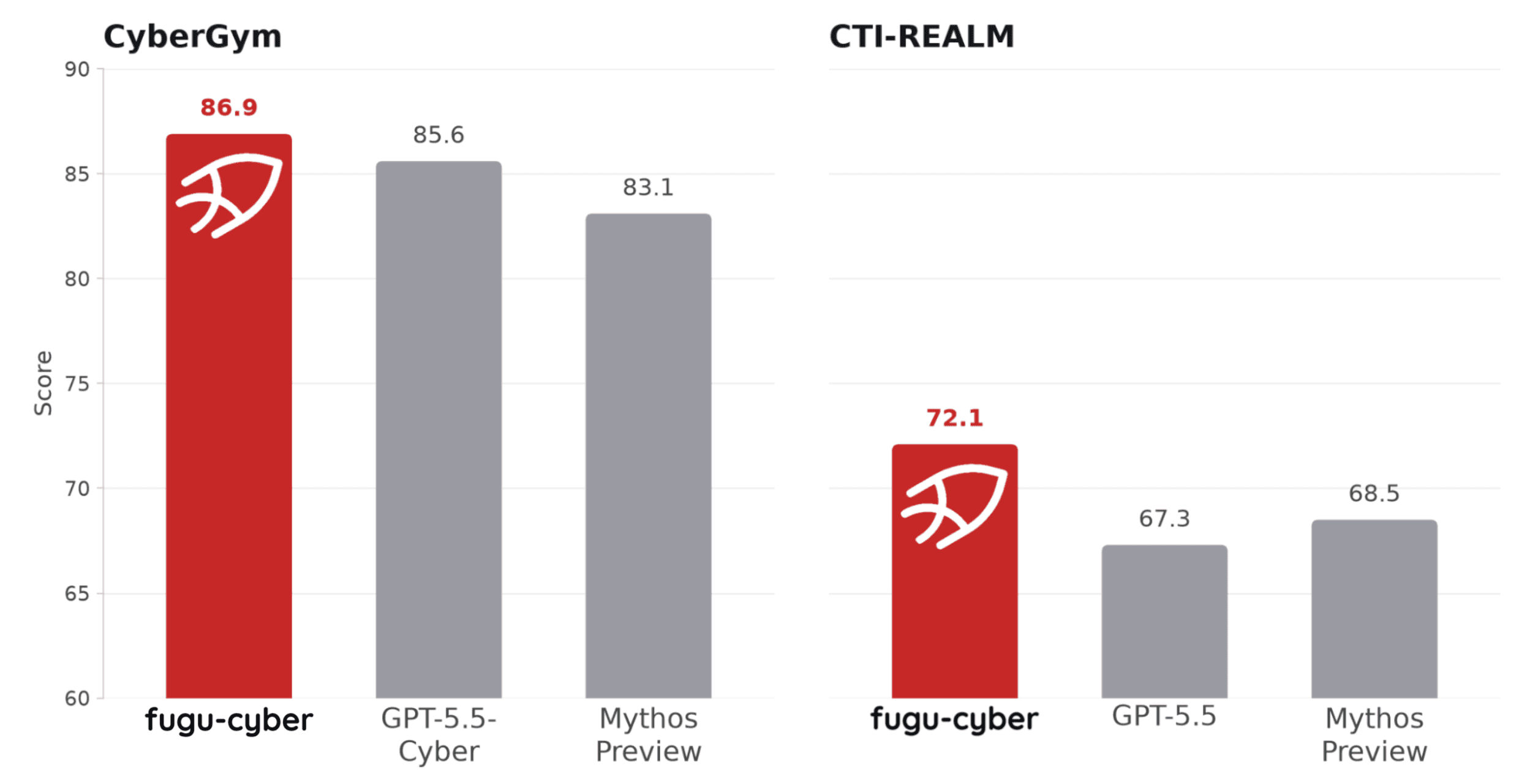
Fugu-Cyber achieves state-of-the-art performance on the industry's most challenging security benchmarks, reaching a success rate of 86.9% on CyberGym and 72.1% on CTI-REALM, comparable to leading cybersecurity-focused frontier models such as GPT-5.5-Cyber and Mythos-Preview.
Example Usage
These examples use the OpenAI-compatible Responses API. Set your environment variables once, then copy and run the Python or cURL example you need.
# pip install openai
import os
from openai import OpenAI

base_url = os.environ["FUGU_BASE_URL"].rstrip("/")
if not base_url.endswith("/v1"):
    base_url = f"{base_url}/v1"

client = OpenAI(
    api_key=os.environ["FUGU_API_KEY"],
    base_url=base_url,
)

with client.responses.stream(
    model="fugu-ultra",
    input="Explain why streaming is useful in three short bullets.",
) as stream:
    for event in stream:
        if event.type == "response.output_text.delta":
            print(event.delta, end="", flush=True)

    # Full response object assembled from the stream.
    response = stream.get_final_response()

print()
print(response)
Supported endpoints
Fugu currently supports the OpenAI-compatible Chat Completions, Responses, and Models APIs, as well as the Anthropic-compatible Messages API. For generation requests, we strongly recommend using the Responses API, for better performance.
Responses API
Use /v1/responses when you want the Responses API shape, especially for tool use, multimodal input, and proper reasoning or function calls management.
For more details, see the OpenAI Responses API reference.
Supported request fields
| Field | Type | Description |
|---|---|---|
model | string | Required. Model ID to use, such as fugu orfugu-ultra. |
input | string | array | Required. A string or an array of Responses-style input items. A string input is treated as a user message. |
instructions | string | System / developer message passed to the model. |
metadata | object | Arbitrary key-value pairs attached to the request. |
stream | boolean | Stream the response. |
max_output_tokens | number | Maximum number of tokens to generate. Note for fugu-ultra, this is applied only to the final model response, orchestrator model still uses maximum token limit. |
reasoning | object | Reasoning controls with an effort value ofhigh, xhigh, or max. xhigh and max are aliases of the same reasoning effort. Default is xhigh for fugu-ultra, high for fugu. |
tools | array | Tool definitions the model may call. |
tool_choice | string | object | Controls whether and which tool is called. |
text.format | object | Structured output with text,json_object, or json_schema. |
temperature | number | Accepted but ignored. |
parallel_tool_calls | boolean | Accepted but ignored. Set to True on the server side for models that support it. |
previous_response_id | string | Not accepted. Send the full conversation history directly in input instead. |
Chat Completions
Use /v1/chat/completions when you want the OpenAI Chat Completions API shape.
For more details, see the OpenAI Chat Completions API reference.
Supported request fields
| Field | Type | Description |
|---|---|---|
model | string | Required. Model ID to use, such as fugu orfugu-ultra. |
messages | array | Required. An array of chat messages with a role (such as system, developer, user, assistant, or tool) and content. User message content can be a string or an array of content parts, depending on the selected model. |
metadata | object | Arbitrary key-value pairs attached to the request. |
stream | boolean | Stream the response. |
stream_options | object | Streaming options such as include_usage. Only set this when stream is true. |
max_completion_tokens | number | Maximum number of tokens to generate. Note for fugu-ultra, this is applied only to the final model response; the orchestrator model still uses its maximum token limit. |
max_tokens | number | Legacy token limit field. Prefer max_completion_tokens for new integrations. |
reasoning_effort / reasoning | string | object | Reasoning controls. Use reasoning_effort or a reasoning object with an effort value of high, xhigh, or max. xhigh and max are aliases of the same reasoning effort. Default is high. |
tools | array | Tool definitions the model may call. |
tool_choice | string | object | Controls whether and which tool is called. |
response_format | object | Structured output with text,json_object, or json_schema. |
top_p | number | Accepted but ignored. |
stop | string | array | Accepted but ignored. |
seed | number | Accepted but ignored. |
frequency_penalty | number | Accepted but ignored. |
presence_penalty | number | Accepted but ignored. |
temperature | number | Accepted but ignored. |
parallel_tool_calls | boolean | Accepted but ignored. Always applied to models that support it. |
Messages API
Use /v1/messages when you want the Anthropic-compatible Messages API shape. Requests are forwarded with the standard Messages request fields, such as model, messages, max_tokens, stream, and tools.
For more details, see the Anthropic Messages API reference.
Models API
Use /v1/models to list the models available through the API. This OpenAI-compatible endpoint returns the supported model IDs. Note: fugu-cyber is returned only through pay-as-you-go billing.
For more details, see the OpenAI Models API reference.
Supported models
| Model ID | Description |
|---|---|
fugu | The default Fugu model. |
fugu-ultra | The Fugu Ultra model, defaults to fugu-ultra-v1.1. |
fugu-ultra-v1.0 | V1.0 of Fugu Ultra, also known as fugu-ultra-20260615. |
fugu-ultra-v1.1 | V1.1 of Fugu Ultra. |
fugu-cyber | The Fugu Cyber model, defaults to fugu-cyber-v1.0. |
fugu-cyber-v1.0 | V1.0 of Fugu Cyber model. |
sakana-namazu-v1.0 | V1.0 of the Sakana Namazu model. A Japanese-specialized LLM. |
sakana-namazu | Alias that points to the latest version (currently sakana-namazu-v1.0). |
Built-in tools
Fugu models support OpenAI-compatible built-in tools in the Responses API. To let the model search the web, add the web_search tool to your request's tools array, just as you would with OpenAI models.
When web search is used, the response can include web search call output. Advance options for the tool are not supported. For more details see the OpenAI web search guide.
# pip install openai
import os
from openai import OpenAI

base_url = os.environ["FUGU_BASE_URL"].rstrip("/")
if not base_url.endswith("/v1"):
    base_url = f"{base_url}/v1"

client = OpenAI(
    api_key=os.environ["FUGU_API_KEY"],
    base_url=base_url,
)

response = client.responses.create(
    model="fugu",
    tools=[{"type": "web_search"}],
    input="Search the web for today's top AI news and summarize it with citations.",
)

print(response.output_text)
Usage fields for Fugu Ultra and Fugu Cyber
Outside of standard Responses API output, Fugu Ultra and Fugu Cyber return usage fields that separate user-visible model work from orchestration work. Note that different to OpenAI, even though the orchestration tokens are stored in token_details fields. They represent real token usage outside of the input, output tokens, and will be counted in the final price of the request. The price will be the same as standard input and output tokens.
{
  "usage": {
    "input_tokens": 120,
    "output_tokens": 80,
    "total_tokens": 200,
    "input_tokens_details": {
      "cached_tokens": 0,
      "orchestration_input_tokens": 0,
      "orchestration_input_cached_tokens": 0
    },
    "output_tokens_details": {
      "orchestration_output_tokens": 0
    }
  }
}| Field | Description |
|---|---|
input_tokens | Tokens from the user input sent to the first model. |
input_tokens_details.cached_tokens | Cached input tokens for the user input. |
input_tokens_details.orchestration_input_tokens | Sum of all input tokens used for orchestration. |
input_tokens_details.orchestration_input_cached_tokens | Cached input tokens from orchestration. |
output_tokens | Tokens in the final output. |
output_tokens_details.orchestration_output_tokens | Output tokens from the orchestration. |
total_tokens | Total token count returned for the request (including orchestration). |